An IPTV player for Windows, free to download.
iptvolt for Windows brings the big-screen TV interface to your PC: live TV, the guide, movies, series and sport, with keyboard or mouse. Download the installer today; it keeps itself up to date.
Free to download. Windows may show a SmartScreen notice for new apps: choose More info, then Run anyway.
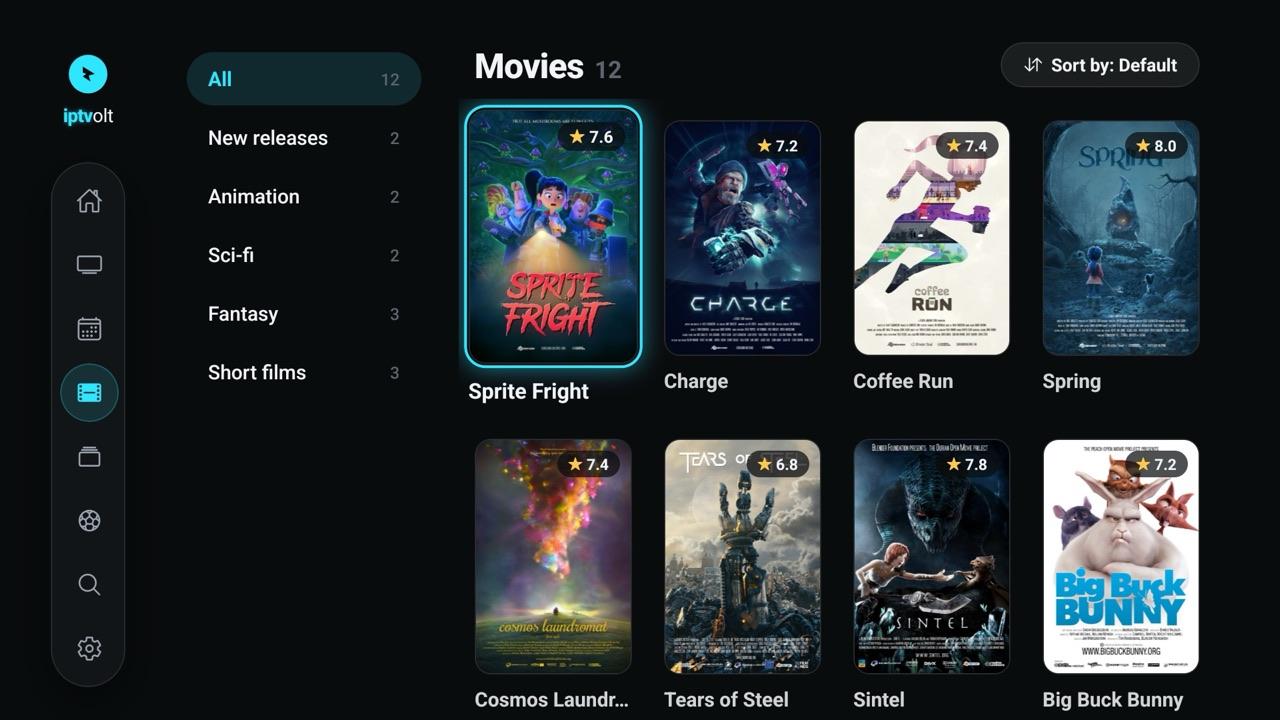
- Available now, free download
- No ads, ever
- One purchase, up to 5 of your devices
- Synced on phone, TV and PC
The big-screen app on your PC.
- 01
Download today
You can install the Windows app right now, straight from iptvolt.com. No store and no account needed.
- 02
Updates itself
New versions download in the background and install when you close the app.
- 03
Keyboard first
Arrows, Enter and Esc drive every screen. Digits zap, Page Up and Page Down change channel.
- 04
Mouse welcome
Click anything you can focus. F11 switches to full screen.
- 05
Synced with your phone
With Pro, scan the code on screen with your phone and your sources and favourites are there.
Set it up in iptvolt
- 01
Download the installer
Download iptvolt-Setup.exe and open it. Windows may show a SmartScreen notice for new apps: choose More info, then Run anyway.
- 02
Add your source
Scan the code on the screen with the iptvolt phone app, or type your M3U link or Xtream login in Settings.
- 03
Watch
Open Live TV and press Enter on a channel. Esc steps back, F11 makes it full screen.
Why iptvolt
Built to be the last player you install.
- Set up once, synced everywhereSources, logins, favourites, settings and continue watching. End-to-end encrypted, no account.
- One purchase, all your devicesPro covers up to 5 of your devices, phones, tablets, TVs and PCs mixed.
- No ads, everThe free version is complete, and it stays free of ads.
- Sport finds its channelToday's games, matched to the channels in your own list.
- A guide you can trustUp to four guide links merged per source, and a real timeline grid.
- Plays everything, never stallsNative player plus a VLC engine, and it reconnects by itself.
Coming from another player?
How to install iptvolt on Windows
iptvolt for Windows runs on Windows 10 and Windows 11, 64-bit. It is not in the Microsoft Store; you get it from iptvolt.com as a regular installer. The download button on this page and on the download page loads the latest iptvolt-Setup.exe from our public release page on GitHub. Run it and iptvolt installs and opens.
Because the app is new and not yet code signed, Windows SmartScreen may warn about an unknown publisher on the first start. Choose More info, then Run anyway. After that the app starts like any other program, and only one window opens even if you start it twice.
Prefer a direct link? Download iptvolt for Windows.
Updates
The Windows app is the same big-screen interface as the TV apps. It checks for new versions on its own, downloads them in the background and installs them when you quit, so you never download it twice. The phone and TV apps are submitted to every store and rolling out.
Keyboard and mouse controls
| Key | What it does |
|---|---|
| Arrow keys and Enter | Move the focus and open the focused item |
| Esc or Backspace | Back, one layer at a time |
| 0 to 9 | Jump to a channel number |
| Page Up and Page Down | Next and previous channel |
| F11 | Full screen on and off |
The mouse pointer stays visible, so you can also click channels, posters and buttons directly.
What plays in the Windows app
HLS streams and live MPEG-TS streams, the two formats most IPTV sources use for live channels, play in the Windows app, along with the guide, catch-up, Movies and Series from an Xtream login, Search and Sport with today’s games matched to channels in your list. The Windows app has no VLC engine, so some movie files in formats like MKV or AVI may not play there; the iPhone and Android apps open those in their built-in VLC engine.
There is no browser version of iptvolt, and no casting, Picture-in-Picture or multi-view on Windows. On a Mac with Apple silicon, iptvolt runs as the iPad app from the Mac App Store; see the iPhone and iPad page.
Pro on Windows
You cannot buy Pro inside the Windows app. Buy it in iptvolt on your phone, then scan the code the PC shows with the phone (Settings → Sync → Add a TV), and Pro covers the PC as one of up to 5 of your devices that share a sync code. Pro is €2.99 a month, €17.99 a year with a 7-day free trial, or €34.99 once; see pricing. The free version plays one source without ads. iptvolt is a player only and provides no channels, playlists or content. For the television, see Fire TV, Android TV, Samsung and LG. On Linux, see iptvolt for Linux.
Questions
Is iptvolt for Windows free?
Yes. The download and the free version are free and show no ads. Pro, bought in iptvolt on your phone, adds unlimited sources, the full guide grid and sync.
Which Windows versions are supported?
Windows 10 and Windows 11, 64-bit. The app installs with a regular installer from iptvolt.com, not from the Microsoft Store.
Why does Windows show a SmartScreen warning?
Windows warns about new apps without a code signing certificate. Choose More info, then Run anyway. It usually appears only the first time.
Does the Windows app update itself?
Yes. It downloads new versions in the background and installs them when you close the app.
Can I use iptvolt in the browser?
No. There is no browser version. On a PC, use the Windows app; on a Mac with Apple silicon, use the iPad app from the Mac App Store.
Does iptvolt for Windows include channels?
No. iptvolt is a media player. It provides no channels, playlists or content and is not affiliated with any provider.
Your last IPTV player.
Rolling out now on phones, tablets, TVs, Mac, Windows and Linux. Pick your screen.