An IPTV app for LG Smart TVs on webOS.
iptvolt is coming to the LG Content Store as a webOS app and is in LG’s quality testing now. It plays the M3U or Xtream source you add, with the Magic Remote or the arrow keys.
Submitted to LG Content Store and in review. The button goes live the moment the store approves.
- Magic Remote and arrow keys
- No ads, ever
- One purchase, up to 5 of your devices
- Synced on phone, TV and PC
Built for LG Smart TVs.
- 01
Pointer or arrows, your choice
Every screen works with the arrow keys and OK alone. Point with the Magic Remote and it selects the item under the pointer just as well.
- 02
Follows your TV’s language
English, German, French, Spanish, Italian or Portuguese, matching the TV, with English as fallback.
- 03
Pauses when you leave
Press Home during a film and it pauses. Come back and it continues; live TV rejoins the live edge.
- 04
Opens without internet
If the network drops, iptvolt still opens with your last catalogue and offers Retry instead of freezing.
- 05
No login, no ads
No account and no email address, and the free version is free of ads.
Set it up in iptvolt
- 01
Install from the LG Content Store
iptvolt is in LG’s app review and quality testing. Once LG approves it, search for iptvolt in the LG Content Store on your TV.
- 02
Add your source
Scan the code on the TV with the iptvolt phone app, or go to Settings → Sources → Add and type your M3U link or Xtream login with the on-screen keyboard.
- 03
Browse and play
Home fills with live channels, movies and series. Press OK to play; Back hides the controls and then returns to the list.
Why iptvolt
Built to be the last player you install.
- Set up once, synced everywhereSources, logins, favourites, settings and continue watching. End-to-end encrypted, no account.
- One purchase, all your devicesPro covers up to 5 of your devices, phones, tablets, TVs and PCs mixed.
- No ads, everThe free version is complete, and it stays free of ads.
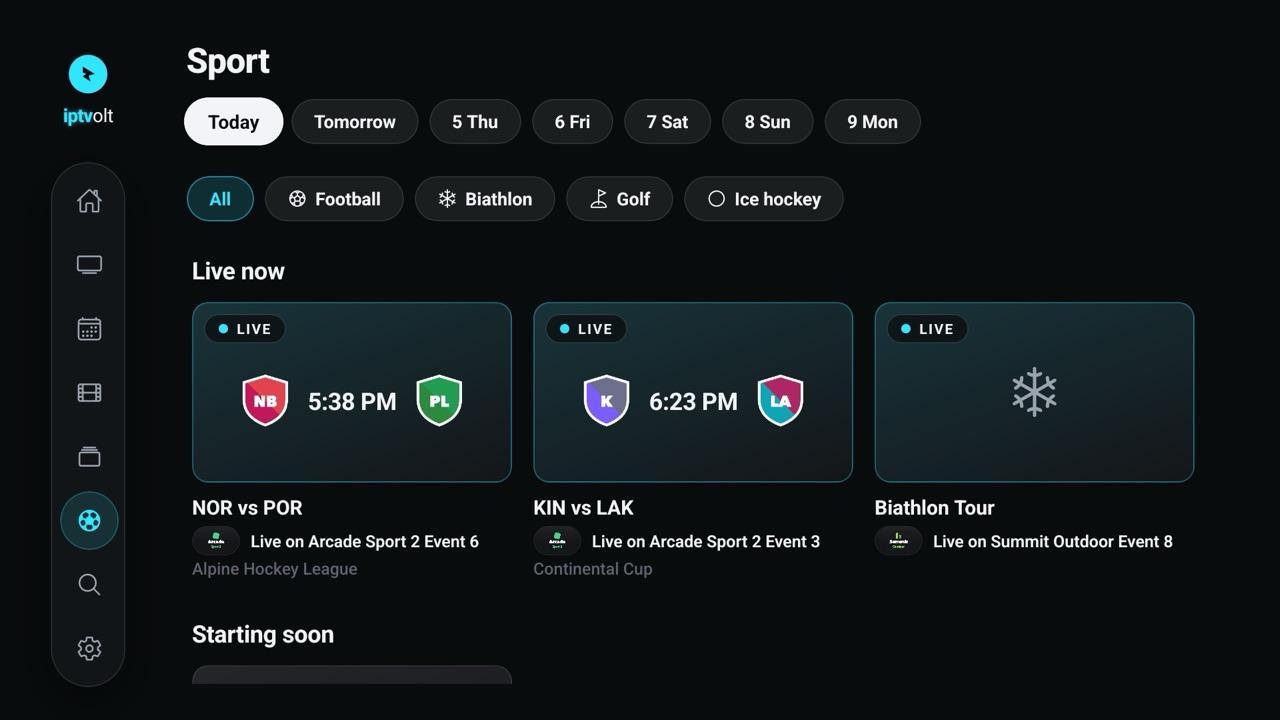
- Sport finds its channelToday's games, matched to the channels in your own list.
- A guide you can trustUp to four guide links merged per source, and a real timeline grid.
- Plays everything, never stallsNative player plus a VLC engine, and it reconnects by itself.
Coming from another player?
Where to get iptvolt for LG TVs
iptvolt for LG is a webOS app distributed through the LG Content Store, the app store built into LG Smart TVs. It is submitted to LG and going through LG’s app review and quality testing, which checks among other things that every function works with the standard remote, that Back always leads somewhere and that the app copes with a lost connection. When LG approves it, the button on this page links to the listing.
If you would rather use a stick, iptvolt also runs on Fire TV and Android TV and Google TV. The download page shows the state of every platform.
Magic Remote and the standard remote
iptvolt is designed for arrow keys first: the focus moves card by card with a visible ring, OK opens the item, and Back steps out one layer at a time. On the Home screen Back opens an exit dialog, where OK closes the app and Back keeps you on Home. The Magic Remote pointer works as well, on everything you can focus.
- Number keys jump to a channel number while you watch.
- Channel up and down, or the arrows up and down, zap to the next channel.
- OK in the player shows the controls for audio track, subtitles, picture format and speed.
- Holding OK on a card opens quick actions: favourite, details and hide.
Live TV, guide and movies on an LG TV
Live TV puts categories on the left and channels on the right, with what is playing now. The guide shows now and next per channel in the free version; the full grid is part of Pro. Movies and Series have a category column and a poster grid, and OK on a title opens its details with Play. Search has an on-screen keyboard with scopes for All, Live, Movies and Series. Guide data comes from your Xtream login or an XMLTV link; if it stays empty, what is EPG and XMLTV explains why.
What to expect from playback on webOS
On an LG TV iptvolt uses the webOS media pipeline, the TV’s own player, for HLS, MPEG-TS and MP4. Formats the TV cannot decode will not play, because the VLC engine of the phone apps does not exist on webOS. Audio tracks and subtitles can be chosen whenever the stream offers them.
Pro on LG TVs
There are no purchases inside the LG app. Buy Pro in iptvolt on your phone and pair the TV under Settings → Sync on the phone; Pro then covers the TV as one of up to 5 of your devices. Pro is €2.99 a month, €17.99 a year with a 7-day free trial, or €34.99 once, as listed on pricing. Casting, Picture-in-Picture and multi-view are phone and tablet features. iptvolt is a player only and provides no channels, playlists or content.
Questions
Is iptvolt in the LG Content Store?
Not yet. iptvolt is submitted to LG and in LG’s app review and quality testing. Once it is approved, search for iptvolt in the LG Content Store on your TV.
Does iptvolt work with the LG Magic Remote?
Yes. The app is built for the arrow keys and OK, and the Magic Remote pointer works on every item you can focus.
Can I buy Pro on my LG TV?
No. The LG app has no in-app purchases. Buy Pro in iptvolt on your phone, then pair the TV, and one purchase covers up to 5 of your devices.
Which video formats does the LG app play?
HLS, MPEG-TS and MP4 through the TV’s own webOS media pipeline. Formats the TV cannot decode will not play, since there is no VLC engine on webOS.
What happens without internet?
iptvolt still opens with the catalogue it saved last time. Playback shows an error card with Retry until the connection is back.
Does iptvolt provide channels for LG TVs?
No. iptvolt is a media player. It provides no channels, playlists or content and is not affiliated with any provider.
Your last IPTV player.
Rolling out now on phones, tablets, TVs, Mac, Windows and Linux. Pick your screen.