An IPTV player for Linux, in a single file.
iptvolt for Linux is one AppImage for 64-bit desktop Linux: live TV, the guide, movies, series and sport from the M3U or Xtream source you add. Free download, nothing to install, and it keeps itself up to date.
Free to download. Make the file executable, then start it. Newer Ubuntu versions need the libfuse2 package.
- Available now, free download
- No ads, ever
- One purchase, up to 5 of your devices
- Synced on phone, TV and PC
The big-screen app on your Linux PC.
- 01
One file, most distros
An AppImage carries everything it needs. Make it executable and start it, no package manager and no repository.
- 02
Stays current
The app looks for new versions by itself and swaps the AppImage for you.
- 03
Made for the keyboard
Arrows, Enter and Esc reach every screen. Digits jump to a channel, Page Up and Page Down zap.
- 04
Your sources only
M3U, M3U8 and XSPF playlists or an Xtream login, with XMLTV guide data. No channels included.
- 05
Part of your sync
With Pro, scan the code on screen with your phone and your sources and favourites arrive end-to-end encrypted.
Set it up in iptvolt
- 01
Download the AppImage
Download iptvolt-Linux.AppImage, then allow it to run: chmod +x iptvolt-Linux.AppImage, or tick Executable in your file manager.
- 02
Start it and add a source
Open the file. Choose Set up manually and type your M3U link or Xtream login, or with Pro scan the code with the iptvolt phone app.
- 03
Watch
Open Live TV and press Enter on a channel. Esc steps back, F11 goes full screen.
Why iptvolt
Built to be the last player you install.
- Set up once, synced everywhereSources, logins, favourites, settings and continue watching. End-to-end encrypted, no account.
- One purchase, all your devicesPro covers up to 5 of your devices, phones, tablets, TVs and PCs mixed.
- No ads, everThe free version is complete, and it stays free of ads.
- Sport finds its channelToday's games, matched to the channels in your own list.
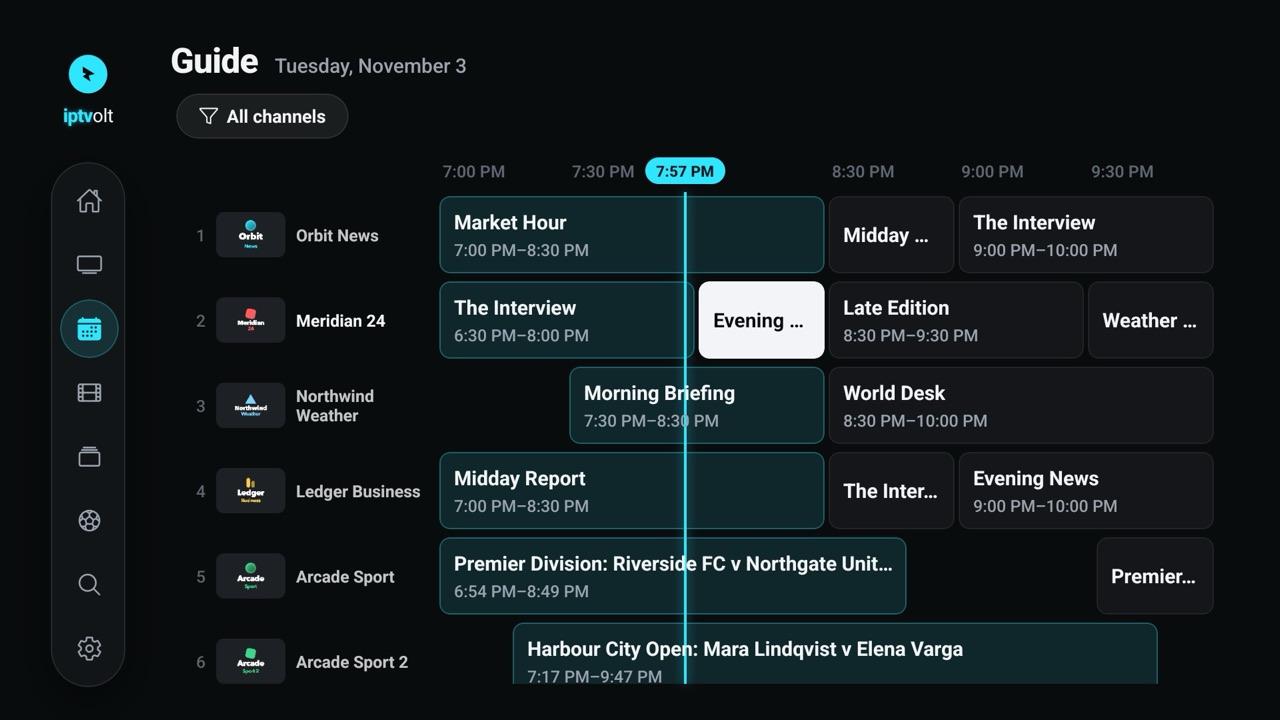
- A guide you can trustUp to four guide links merged per source, and a real timeline grid.
- Plays everything, never stallsNative player plus a VLC engine, and it reconnects by itself.
Coming from another player?
How to run iptvolt on Linux
iptvolt ships for Linux as an AppImage for 64-bit (x86-64) desktops. It is not in a distribution repository, Flathub or Snap; you get it from our public release page. Save the file wherever you keep programs, then run chmod +x iptvolt-Linux.AppImage and ./iptvolt-Linux.AppImage.
AppImages need FUSE 2. Many current distributions no longer include it by default: on recent Ubuntu versions install the libfuse2 package (named libfuse2t64 on Ubuntu 24.04) if the file refuses to start.
Direct link: download iptvolt for Linux. All platforms are on the download page.
How the Linux app works
The Linux app shares its code with the Windows app: the same big-screen interface in a desktop window, controlled with keyboard and mouse. Video playback depends on your graphics drivers and desktop, so results can differ between setups. If something doesn’t work on yours, tell us your distribution at contact@schantastic.com.
What plays on Linux
HLS and live MPEG-TS, the formats most IPTV sources use for live channels, are what the app is built to play here, alongside the guide, catch-up, Movies and Series from an Xtream login, Search and Sport with today’s games matched to channels in your own list. There is no VLC engine on Linux, so some movie files in formats like MKV or AVI may not open. The iPhone and Android apps have that engine built in.
There is no casting, Picture-in-Picture or multi-view on Linux, and no browser version of iptvolt on any platform.
Pro on Linux
You can’t buy Pro inside the Linux app. Buy it in iptvolt on your phone, then scan the code on the PC with the phone (Settings → Sync → Add a TV), and the PC counts as one of up to 5 of your devices that share a sync code. See pricing for the plans. The free version plays one source without ads. iptvolt is a player only and provides no channels, playlists or content.
Questions
Which Linux distributions does iptvolt run on?
iptvolt is an AppImage for 64-bit (x86-64) desktop Linux, a format that runs on most current distributions. Video playback depends on your graphics drivers.
Why won't the AppImage start?
Check that the file is executable (chmod +x iptvolt-Linux.AppImage) and that FUSE 2 is installed. On recent Ubuntu versions that is the libfuse2 package, or libfuse2t64 on Ubuntu 24.04.
Does the Linux app update itself?
Yes. It looks for new versions on its own and replaces the AppImage, so keep the file somewhere you can write to.
Is there a deb, Flatpak or Snap?
Not at the moment. iptvolt for Linux is available as an AppImage only.
Is iptvolt for Linux free?
Yes. The download and the free version are free and show no ads. Pro is bought in iptvolt on your phone and adds unlimited sources, the full guide grid and sync.
Does iptvolt for Linux include channels?
No. iptvolt is a media player. It provides no channels, playlists or content and is not affiliated with any provider.
Your last IPTV player.
Rolling out now on phones, tablets, TVs, Mac, Windows and Linux. Pick your screen.