An IPTV player for Fire TV, built for the remote.
iptvolt for Fire TV plays the M3U playlist or Xtream login you already have. Zap with channel numbers, browse the guide, movies and series, and set it up with the remote or, with Pro, by scanning a code.
Available now on Amazon Appstore.
- Channel numbers on the Fire TV remote
- No ads, ever
- One purchase, up to 5 of your devices
- Synced on phone, TV and PC
Built for Fire TV sticks and TVs.
- 01
Made for the Fire TV remote
Every screen works with the D-pad and OK. Focus is always visible, Back always takes you one step back, and on Home it asks before the app closes.
- 02
Type a channel number
On a remote with number keys, typing a number jumps straight to that channel. Up and down zap while you watch.
- 03
No typing on the TV
With Pro, scan the code on the TV with your phone and your sources come over, end-to-end encrypted.
- 04
Two playback engines
Live streams play in the native Android player; MKV, AVI and raw TS open in the built-in VLC engine.
- 05
Guide and catch-up, free
Now and next on every channel, and catch-up wherever your provider records programmes.
Set it up in iptvolt
- 01
Get iptvolt from the Amazon Appstore
iptvolt is on the Amazon Appstore. Search for iptvolt on your Fire TV and install it. No account and no email address.
- 02
Bring your source over
The TV shows a code. On your phone open iptvolt, then Settings → Sync → Add a TV and scan it. Without sync, choose Set up manually and type your link.
- 03
Watch with the remote
Open Live TV, pick a category and press OK on a channel. Press up and down to zap, or type a number if your remote has number keys.
Why iptvolt
Built to be the last player you install.
- Set up once, synced everywhereSources, logins, favourites, settings and continue watching. End-to-end encrypted, no account.
- One purchase, all your devicesPro covers up to 5 of your devices, phones, tablets, TVs and PCs mixed.
- No ads, everThe free version is complete, and it stays free of ads.
- Sport finds its channelToday's games, matched to the channels in your own list.
- A guide you can trustUp to four guide links merged per source, and a real timeline grid.
- Plays everything, never stallsNative player plus a VLC engine, and it reconnects by itself.
Coming from another player?
Which Fire TV devices does iptvolt run on?
iptvolt for Fire TV is an Android app for Fire TV sticks, cubes and TVs that run Fire OS, installed from the Amazon Appstore. Some recent Fire TV sticks run Vega OS instead, which does not run Android apps, so iptvolt is not available on those. It is the same player as on phones, with its own interface for the television: a side menu on the left, big rows of channels and posters, and text sized to read from the sofa.
The Fire TV app is available on the Amazon Appstore: search for iptvolt on your Fire TV or use the store button on this page. Every other platform is listed on the download page.
How do I add my M3U or Xtream login on a Fire TV?
There are two ways, and neither needs a keyboard:
- Scan with your phone. On first start the Fire TV shows a QR code. In the iptvolt phone app go to Settings → Sync → Add a TV, scan it and confirm the check code. The TV joins your sync space and gets your sources, logins, favourites and settings, end-to-end encrypted.
- Type it with the remote. Choose Set up manually and enter an M3U link, or the server, username and password of an Xtream login, with the on-screen keyboard.
Scanning uses sync, which is part of Pro. Typing it in works in the free version. If you are not sure which kind of source you have, read M3U vs Xtream Codes.
Using iptvolt with the Fire TV remote
Arrows move the focus, OK opens what is focused, and Back closes the topmost layer first: the player controls, then the player, then the screen. On Home, Back asks whether you want to leave, so a stray press never throws you out. Holding OK on a channel or poster opens quick actions: favourite, details, hide, or the programme guide for that channel with its catch-up replays.
In the player, up and down or the channel keys zap in place, and left and right jump 10 seconds in a movie or in catch-up. Play and Pause do what they say. The Fire TV remote acts once per press, so in very long lists the quickest way through is channel up and down, or typing the channel number.
Guide, catch-up and sport on Fire TV
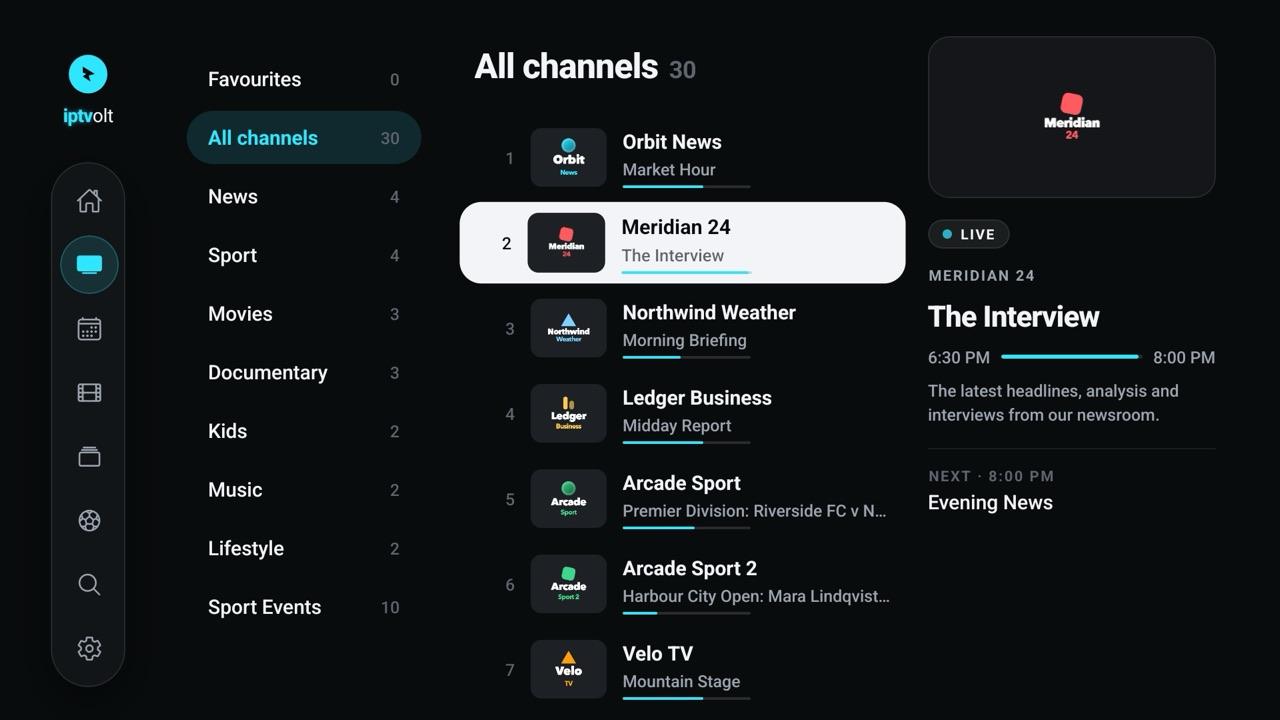
Live TV shows your categories on the left and the channels on the right, each with its number, logo, the programme on now with a progress bar, and what comes next. The guide screen shows now and next for free; the full timeline grid is part of Pro. Pressing OK on a programme opens Watch, Start over or Catch-up when your provider records that channel.
The Sport screen lists today’s games and matches each one to a channel in your own list, so OK on a game starts the right channel. iptvolt never adds channels; if your list has no match, the game simply has no Watch button. More on guide data in EPG not working? How to fix the guide.
Free, Pro and what the Fire TV app leaves out
The free version plays one source with live TV, movies, series, now and next and catch-up, without ads. Pro adds unlimited sources, the full guide grid, sync and favourite folders, and covers up to 5 of your devices that share a sync code. You can buy it on the Fire TV through Amazon or on your phone. Pro costs €2.99 a month, €17.99 a year with a 7-day free trial, or €34.99 once; see pricing.
Casting, Picture-in-Picture and multi-view are phone and tablet features and are not in the TV app. There is no voice search inside the app yet; Search has an on-screen keyboard instead. iptvolt is a player only: it provides no channels, playlists or content. Have an Android TV or Google TV as well? See iptvolt for Android TV.
Questions
Is iptvolt on the Amazon Appstore?
Yes. iptvolt for Fire TV is on the Amazon Appstore. Search for iptvolt on your Fire TV and install it.
Does iptvolt work on every Fire TV Stick?
It runs on Fire TV devices with Fire OS, the Android based system on most Fire TV sticks, cubes and TVs. Fire TV devices with Vega OS do not run Android apps, so iptvolt is not available there.
Can I type a channel number on the Fire TV remote?
Yes, on remotes with number keys: type the number and iptvolt jumps to that channel. Channel up and down zap while you watch.
Do I have to type my login with the remote?
No. Scan the code on the TV with the iptvolt phone app and your sources come over end-to-end encrypted. That uses sync, part of Pro. In the free version you type the link once with the on-screen keyboard.
Does iptvolt include channels for Fire TV?
No. iptvolt is a media player. It provides no channels, playlists or content and is not affiliated with any provider. You add a source you are allowed to use.
Can I use Picture-in-Picture on Fire TV?
No. Picture-in-Picture, multi-view and casting are phone and tablet features. The Fire TV app focuses on live TV, the guide, movies, series, catch-up and sport.
Your last IPTV player.
Rolling out now on phones, tablets, TVs, Mac, Windows and Linux. Pick your screen.