An IPTV player with an EPG guide you can trust.
iptvolt reads the guide that comes with your source, merges up to four guide links and matches them carefully. Now and next is free; Pro adds the timeline grid.
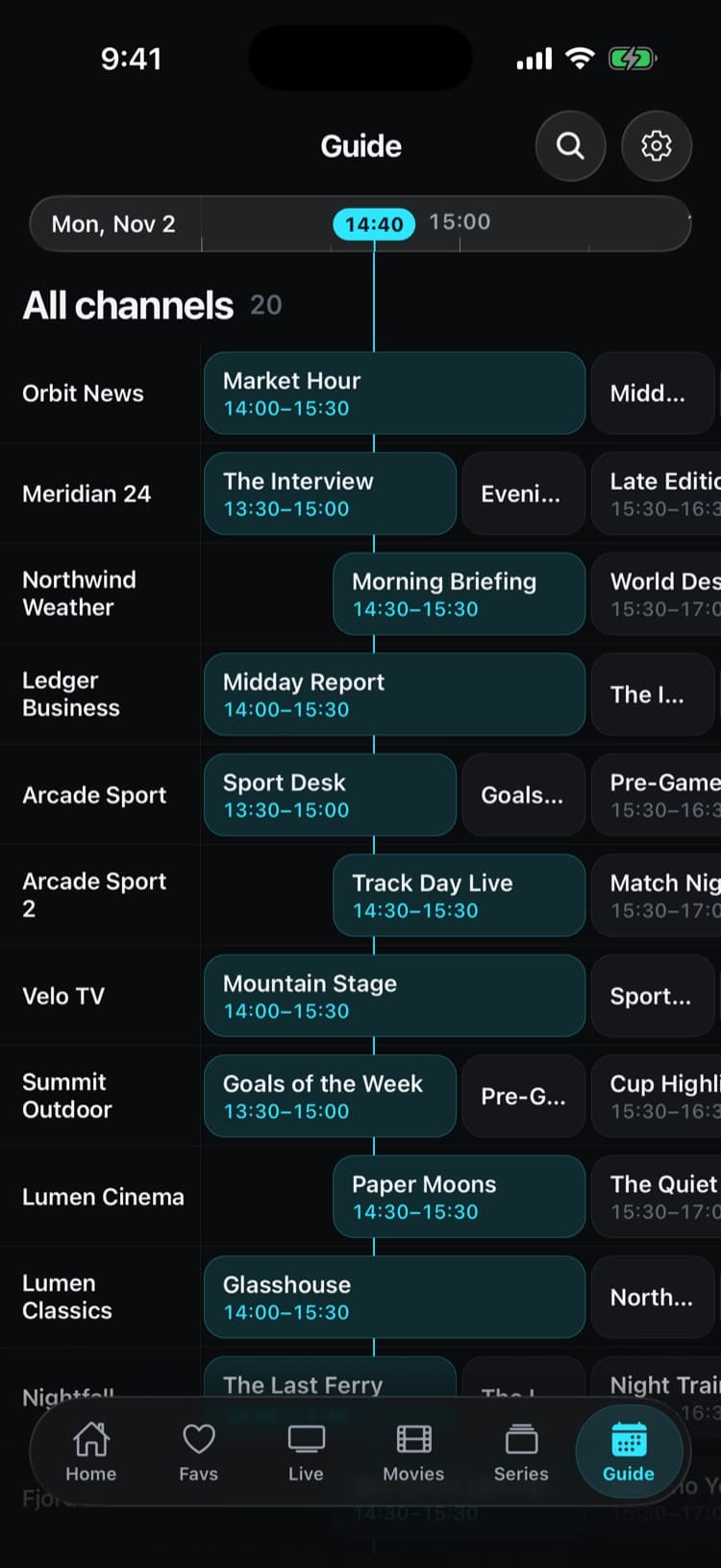
Real app screens with a demo source. iptvolt ships no content.
- Up to four guide links merged
- No ads, ever
- One purchase, up to 5 of your devices
- Synced on iPhone, iPad and Android
The guide, done properly.
- 01
Up to four guide links, merged
Your EPG link, the guide named in the playlist header and the Xtream guide merge per channel. Later guides only fill the gaps.
- 02
Now and next, free
Every channel with guide data shows what’s on and what’s next, in the channel list and in the Guide tab.
- 03
Full timeline grid with Pro
Scroll channels and hours in one grid. The free version previews your first channels over the next two hours.
- 04
No guessing on matches
tvg-id first, then the cleaned-up channel name. An unclear match gets no guide rather than the wrong one.
- 05
Times that add up
Plain or gzip XMLTV, converted to your device’s time. Xtream servers that write local time as UTC are corrected.
The guide even finds the match.
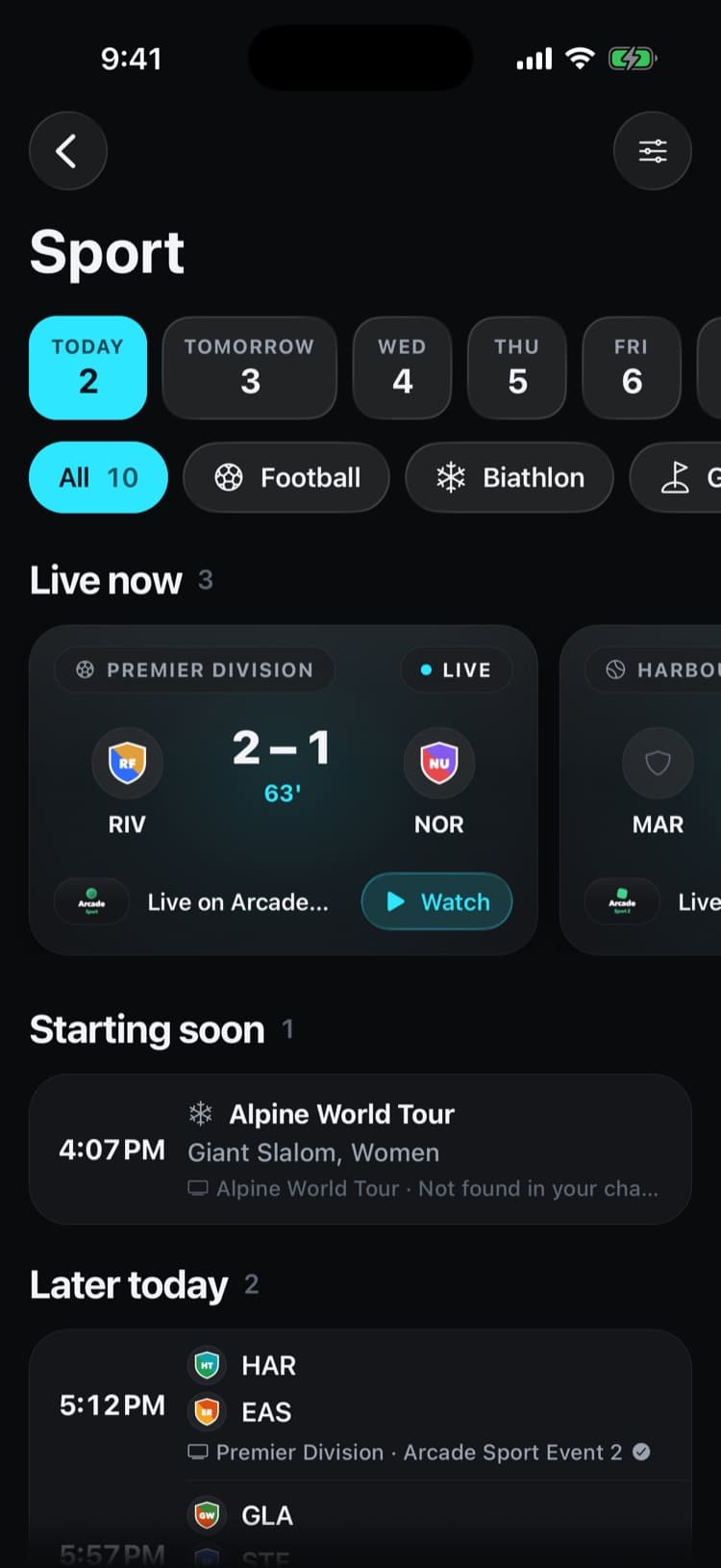
iptvolt matches today’s games to your own channels, from event channels or the guide. Tap a game and the channel plays.
- Today’s games free, the whole week with Pro
- Follow your teams and set reminders
- Schedules from public sports data, never the broadcast
Set it up in iptvolt
- 01
Add your source
Sign in with Xtream, which brings its own guide, or paste an M3U or XSPF link and put your XMLTV link in the optional EPG URL field.
- 02
Let the guide load
iptvolt downloads the guide in the background and matches it to your channels. Now and next appear on the Live tab and in the Guide.
- 03
Browse and watch
Open the Guide tab to see what is on, tap a channel to play it, or open catch-up on channels whose provider records past programmes.
Why iptvolt
Built to be the last player you install.
- Set up once, synced everywhereSources, logins, favourites, settings and continue watching. End-to-end encrypted, no account.
- One purchase, all your devicesPro covers up to 5 of your devices, iPhone, iPad and Android mixed.
- No ads, everThe free version is complete, and it stays free of ads.
- Sport finds its channelToday's games, matched to the channels in your own list.
- A guide you can trustUp to four guide links merged per source, and a real timeline grid.
- Plays everything, never stallsNative player plus a VLC engine, and it reconnects by itself.
Coming from another player?
Where does the guide data come from?
From your own source, never from iptvolt. The app ships no guide data and makes up no schedule. It shows the programme information your source provides, which reaches it from one of three places: your EPG link, the guide named in the playlist header, or your Xtream login.
- Your EPG link. An XMLTV address you enter when you add an M3U or XSPF playlist.
- The playlist header. Many playlists name their guide with
url-tvgorx-tvg-urlin the first line. iptvolt reads it on its own. - Your Xtream login. The server provides its guide, so you need no extra link.
When there is more than one, iptvolt merges them per channel in that order of priority: later guides only fill gaps. The guide window runs from three hours back to roughly a day ahead, which keeps it fast on a phone. The guide to EPG and XMLTV explains the format in more detail.
How are channels matched to the guide?
By tvg-id first, then by a cleaned-up channel name. An XMLTV file lists channels with an id and programmes for each id, and the playlist has to say which of its channels is which. When neither gives a clear match, iptvolt shows no guide rather than a wrong one. The order:
- The tvg-id attribute of the channel, compared with the guide’s channel id, ignoring case.
- The channel name, with country prefixes, quality tags like HD or 4K, accents and punctuation removed.
If the same name appears under two different country prefixes and there is no tvg-id, iptvolt leaves that channel without a guide. A missing guide is easier to notice than a wrong one.
For Xtream logins, iptvolt also corrects a common server quirk: many servers write their local wall-clock time into the guide as if it were UTC, which shifts every programme by a few hours. iptvolt reads the server’s time zone and converts the times, including daylight saving changes. When a server holds its guide twice, shifted by whole hours, the app keeps one schedule.
The guide also drives other parts of the app. The programme bar in the player shows how far into a show you are, the sleep timer can stop at the end of the programme, and the catch-up list for M3U channels is built from past guide entries.
Free and Pro
| Guide feature | Free | Pro |
|---|---|---|
| Now and next on every channel | Yes | Yes |
| Catch-up and Start over | Yes | Yes |
| Full timeline grid | Preview | Yes |
| Guides from several sources | One source | Unlimited sources |
Pro costs €2.99 a month, €17.99 a year with a 7-day free trial, or €34.99 once. Store prices may vary by country. Details are on the pricing page.
Why is my EPG empty or showing the wrong times?
An empty guide usually means the EPG link doesn’t open or belongs to another provider than the playlist. Times shifted by whole hours mean the guide file carries the wrong time zone offset, which the source has to fix. Single empty channels have a tvg-id that matches nothing in the guide.
EPG not working? walks through every fix, and the support page has more checks.
Questions
Does iptvolt include TV guide data?
No. iptvolt ships no channels and no guide data. It shows the programme information your own source provides: an XMLTV link, the guide named in your playlist, or the guide of your Xtream login.
Is the EPG guide free in iptvolt?
Now and next on every channel is free, and so are catch-up and Start over. The full timeline grid, where you scroll through channels and hours, is part of iptvolt Pro.
Do I need an EPG link for an Xtream login?
No. An Xtream server provides its own guide, so iptvolt loads it from your login. For M3U and XSPF playlists you add an XMLTV link, unless the playlist header already names one.
Can iptvolt read gzip-compressed XMLTV files?
Yes. iptvolt reads XMLTV guides as plain XML or gzip-compressed, and converts programme times with their time zone offsets to the time on your device.
Why do some channels show no programmes?
The channel couldn’t be matched to the guide. iptvolt matches by tvg-id first, then by name. If neither fits, or the name is ambiguous across countries, the channel gets no guide rather than a wrong one.
Your last IPTV player.
iptvolt is coming to the App Store and Google Play.