An IPTV app for Samsung Smart TVs.
iptvolt runs on Samsung Smart TVs from 2022 on, straight from the TV’s app store, rolling out in the USA first. Add your own M3U or Xtream source and watch with the Samsung remote, no box or stick needed.
Submitted to Samsung Apps and in review. The button goes live the moment the store approves.
- Tizen, 2022 models and newer
- No ads, ever
- One purchase, up to 5 of your devices
- Synced on phone, TV and PC
Straight on your Samsung TV.
- 01
No extra box, no stick
iptvolt is a Tizen app on the Samsung TV itself. One remote, one input, and the TV’s own video engine does the decoding.
- 02
Pairs with your phone
With Pro, scan the code on the TV with the iptvolt phone app and your sources arrive, end-to-end encrypted.
- 03
Numbers and channel keys
Type a channel number or press channel up and down, just like the TV’s own tuner.
- 04
A guide on every channel
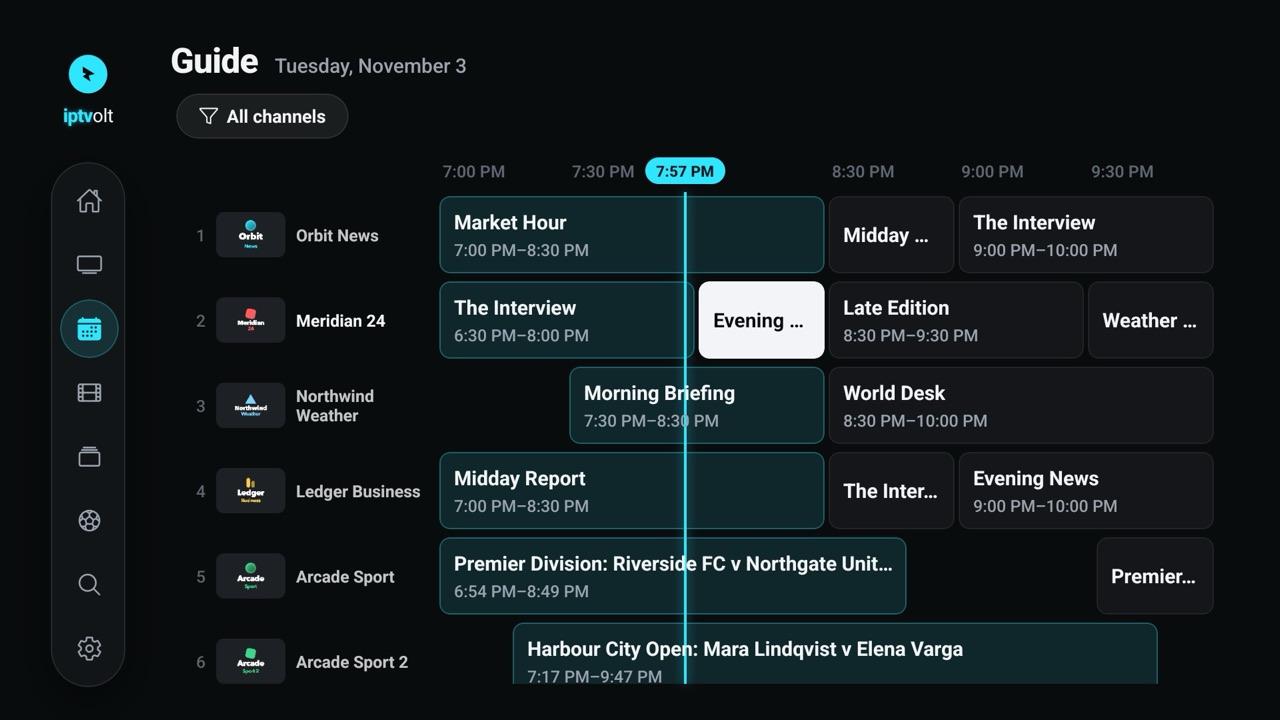
Now and next for free, the full grid with Pro, and catch-up where your provider records.
- 05
Pro comes from your phone
Samsung TVs have no in-app purchases. Pro bought on your phone covers the TV once it joins your sync code.
Set it up in iptvolt
- 01
Find iptvolt on your Samsung TV
iptvolt is submitted to Samsung’s TV app store and rolls out in the USA first, with more countries to follow. Search for iptvolt in Apps on your TV once it is listed.
- 02
Connect your source
Scan the QR code on the TV with the iptvolt phone app under Settings → Sync → Add a TV. Or pick Set up manually and enter an M3U link or Xtream login.
- 03
Start watching
Use the arrows and OK to pick a channel, Back to step out, and the number and channel keys to zap.
Why iptvolt
Built to be the last player you install.
- Set up once, synced everywhereSources, logins, favourites, settings and continue watching. End-to-end encrypted, no account.
- One purchase, all your devicesPro covers up to 5 of your devices, phones, tablets, TVs and PCs mixed.
- No ads, everThe free version is complete, and it stays free of ads.
- Sport finds its channelToday's games, matched to the channels in your own list.
- A guide you can trustUp to four guide links merged per source, and a real timeline grid.
- Plays everything, never stallsNative player plus a VLC engine, and it reconnects by itself.
Coming from another player?
Which Samsung TVs can run iptvolt?
iptvolt is built for Samsung Smart TVs running Tizen, from the 2022 models on. It is submitted to Samsung’s app store and in review, and rolls out in the USA first, with more countries to follow. Until it is listed in your country, the button on this page shows Link at launch. Older Samsung TVs, or TVs in countries where it is not listed yet, can run iptvolt through a Fire TV or Google TV stick plugged into HDMI: see Fire TV and Android TV and Google TV.
Setting it up without typing on the TV
Entering a long playlist link with a TV remote is slow, so iptvolt avoids it. When the app starts on the Samsung TV it shows a QR code. Open iptvolt on your phone, go to Settings → Sync → Add a TV and scan it. After you confirm the check code, the TV joins your sync space and gets your sources, logins, favourites and settings, encrypted end to end so only your devices can read them.
Pairing works through sync, which is part of Pro. Without Pro, Set up manually lets you type an M3U link or the server, username and password of an Xtream login with the on-screen keyboard. The guides on adding an M3U playlist and adding Xtream Codes explain what each field means.
Watching with the Samsung remote
The arrows move a clearly visible focus and OK selects. Back closes whatever is on top, the player controls, then the player, then the screen, and on Home iptvolt asks before it closes. Where your remote has number keys, type a channel number and iptvolt jumps to it; the channel up and down keys zap in the player, and Play and Pause work on movies and catch-up.
Live TV lists your categories next to the channels, each with its number, logo and the programme on now. The guide shows now and next, and OK on a programme offers Start over or Catch-up when your provider records it. Sport lists today’s games and matches them to channels already in your list.
Formats and limits on Samsung TVs
On a Samsung TV, iptvolt plays through the TV’s own video engine. HLS streams, the most common IPTV format, and usual movie files play well. There is no built-in VLC engine on TVs like this, so an MKV file or an HEVC stream only plays when the TV’s own decoder supports it. Protected (DRM) channels cannot be played on any iptvolt app.
Casting, Picture-in-Picture and multi-view are phone and tablet features. In-app purchases do not exist on the Samsung app: buy Pro in iptvolt on your phone, then pair the TV, and Pro covers it as one of up to 5 of your devices. Pro costs €2.99 a month, €17.99 a year with a 7-day free trial, or €34.99 once; details on pricing. iptvolt brings no channels or playlists. It plays the source you add.
Questions
Is iptvolt available on Samsung Smart TVs?
It is rolling out. iptvolt is submitted to Samsung’s TV app store and in review, starting in the USA, with more countries to follow.
Which Samsung TV models are supported?
Samsung Smart TVs running Tizen from the 2022 models on. For older models, a Fire TV or Google TV stick on HDMI runs iptvolt as well.
Can I buy Pro on my Samsung TV?
No. Samsung TVs have no in-app purchases in iptvolt. Buy Pro in iptvolt on your phone, then pair the TV in Settings → Sync and Pro covers it too.
Does iptvolt play MKV files on a Samsung TV?
Only when the TV’s own decoder supports the file. The Samsung app plays through the TV’s video engine and has no VLC engine. HLS live streams are the safest format.
Is iptvolt available outside the USA on Samsung TVs?
The Samsung app starts in the USA and more countries will follow. Elsewhere you can use a Fire TV or Google TV stick, or the iPhone and Android apps with casting.
Does iptvolt for Samsung include channels?
No. iptvolt is a media player. It provides no channels, playlists or content and is not affiliated with any provider.
Your last IPTV player.
Rolling out now on phones, tablets, TVs, Mac, Windows and Linux. Pick your screen.